


Healthcare revenue cycle management involves hundreds of interconnected processes. Insurance eligibility verification alone touches multiple payer portals, patient records, and billing systems. Prior authorization requires gathering clinical documentation, submitting requests, and tracking approvals across different payer requirements.
When organizations approach automation without a structured methodology, they encounter predictable problems. Integration challenges surface late in development. Exceptions overwhelm poorly designed workflows. And teams spend months building solutions that don't fit actual operational needs.
The automation lifecycle addresses these challenges by breaking complex projects into manageable phases. Each phase has clear objectives, deliverables, and decision points. This structure helps teams identify problems early, when they're cheaper and easier to fix.
Consider a metropolitan hospital implementing RPA for insurance eligibility verification. Without a lifecycle framework, the team might jump straight into development, only to discover weeks later that their bot can't handle certain payer portal configurations. With the lifecycle approach, they would identify these integration requirements during the design phase and build appropriate solutions from the start.
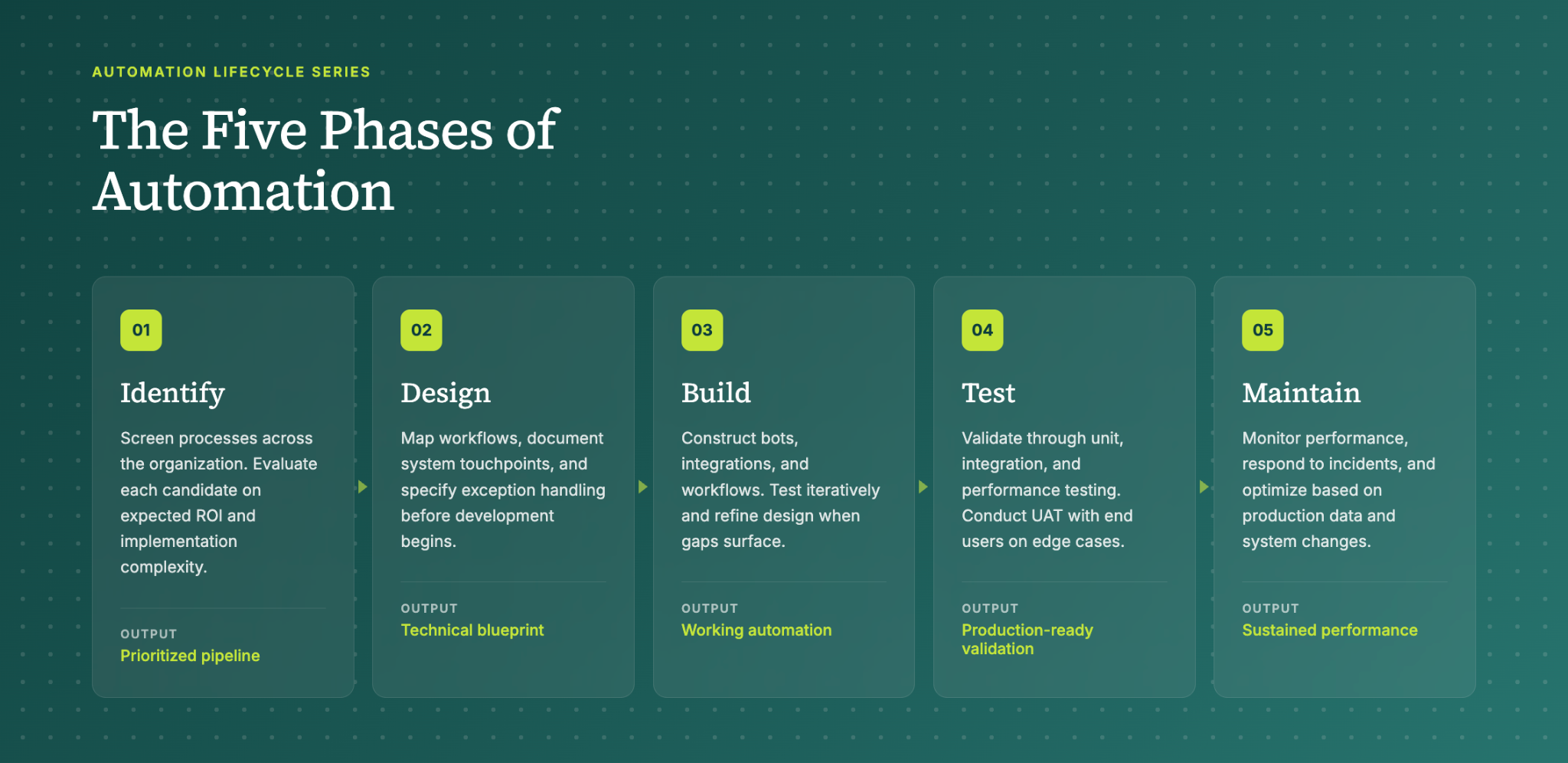
The Five Phases of Automation
The automation lifecycle consists of five distinct phases: Identify, Design, Build, Test, and Maintain. Each phase builds on the previous one, creating a logical progression from initial concept to ongoing optimization.
01 Identify
The Identify phase establishes the foundation for your entire automation program. You can't automate effectively without first understanding which processes will deliver the greatest value with acceptable complexity.
During this phase, teams conduct comprehensive process screening across the organization. For revenue cycle operations, this means examining front-end functions like patient scheduling and eligibility verification, mid-cycle processes like charge capture and coding, and back-end operations like claim submission and denial management.
Each potential automation candidate gets evaluated on two primary dimensions: expected ROI and implementation complexity. A Medicaid eligibility checking automation might deliver $1 million in annual value, but require complex integrations with state databases. A simpler appointment cancellation workflow might only save $60,000 annually but could be deployed in weeks with minimal technical risk.
The output of the Identify phase is a prioritized pipeline of automation opportunities. This pipeline guides resource allocation and helps leadership make informed decisions about where to invest development effort.
02 Design
The Design phase translates your prioritized opportunities into technical specifications. This is where theoretical potential becomes practical planning.
Design work starts with detailed process documentation. Teams map current workflows, identify all system touchpoints, and document the exceptions that human workers handle routinely but that automation will need to address explicitly. For a claim status checking automation, this might involve cataloging every payer portal's login process, status response formats, and error conditions.
The design deliverable is a technical blueprint that serves as the development team's primary reference. This blueprint specifies data inputs, processing logic, system integrations, and expected outputs. It also identifies risks and mitigation strategies.
Good design anticipates problems before they occur. If an eligibility verification automation will query Medicaid databases, the design should address what happens when the database is unavailable, when patient information doesn't match, or when coverage has changed since the last check.
03 Build
The Build phase converts your design blueprint into working automation. Development teams construct the actual bots, integrations, and workflows that will execute your automated processes.
Build work requires close attention to the existing technology environment. Automations must integrate seamlessly with EHR systems, practice management platforms, clearinghouses, and payer portals. A prior authorization bot that can't pass data correctly to your Epic instance won't deliver value regardless of how elegant its internal logic.
Testing occurs throughout the Build phase, not just at the end. Developers verify individual components as they're completed, then test integrated systems progressively. This iterative approach catches problems early and prevents the costly rework that results from discovering fundamental issues late in development.
The Build phase often surfaces design gaps. When developers encounter scenarios the design didn't anticipate, they loop back to refine specifications. This iteration is normal and expected. The goal isn't to execute the original design perfectly but to produce automation that works correctly in production.
04 Test
The Test phase validates that your built automation performs reliably before deployment. Comprehensive testing protects against production failures that could disrupt operations or compromise data integrity.
Testing proceeds through multiple levels. Unit testing verifies individual automation components in isolation. Integration testing confirms that components work together correctly and that the automation interfaces properly with external systems. Performance testing evaluates how the automation handles varying workloads and identifies potential bottlenecks.
User acceptance testing (UAT) is the final validation gate. End users who will work with the automation in production verify that it meets their operational needs. UAT often reveals usability issues or workflow gaps that technical testing missed.
For revenue cycle automations, testing should include realistic exception scenarios. What happens when a payer portal returns an unexpected error code? How does the automation handle a patient with multiple active insurance coverages? Testing against edge cases prevents production surprises.
05 Maintain
The Maintain phase ensures your automation continues performing effectively after deployment. Production automations require ongoing attention to sustain their value.
Maintenance activities include routine monitoring, performance optimization, and incident response. When a payer changes their portal interface, your claim status automation may need updates. When your organization adds a new service line, existing charge capture automations may require modification.
The Maintain phase also encompasses continuous improvement. Production data reveals optimization opportunities that weren't visible during development. Usage patterns suggest workflow refinements. Staff feedback identifies pain points that targeted enhancements can address.
Effective maintenance extends automation lifespan and protects your implementation investment. Without maintenance, automations degrade over time as the systems and processes they depend on evolve.
How This Framework Drives Results
The automation lifecycle delivers value through several mechanisms that compound over time.
Early Problem Detection: Structured phases with clear deliverables surface issues when they're cheapest to fix. A design flaw caught during review costs hours to correct. The same flaw discovered in production might require weeks of rework plus operational disruption.
Resource Efficiency: Prioritization during the Identify phase ensures development effort flows to high-value opportunities. Teams avoid spending months on automations that deliver marginal returns while higher-impact opportunities wait in queue.
Consistent Quality: Repeatable processes produce reliable outcomes. When every automation project follows the same lifecycle, teams develop expertise that transfers across projects. Quality improves as institutional knowledge accumulates.
Adaptability: The iterative nature of the lifecycle accommodates change without derailing progress. When requirements shift or new information emerges, teams can adjust their approach at defined decision points rather than abandoning work in progress.
For healthcare organizations managing complex revenue cycle operations, these benefits translate directly to financial performance. Faster deployment means earlier realization of automation value. Higher quality means fewer production incidents and less staff time spent managing exceptions. Better prioritization means scarce development resources generate maximum return.
Getting Started
The automation lifecycle provides a framework, but execution requires expertise. Healthcare revenue cycle processes involve specialized knowledge of payer requirements, regulatory constraints, and clinical workflows that general automation experience doesn't cover.
Organizations pursuing RCM automation face a choice: build internal capabilities over time through trial and error, or partner with specialists who bring proven methodologies and accumulated experience. The right approach depends on your timeline, risk tolerance, and available resources.
Either way, the lifecycle framework gives you a common language and structured approach for evaluating progress and making decisions. That structure is what separates successful automation programs from expensive learning experiences.
Frequently Asked Questions
Q: What is the RCM automation lifecycle?
This is Tarpon Health’s five-phase framework (Identify, Design, Build, Test, Maintain) for developing healthcare revenue cycle automations.
Q: How long does it take to implement an RCM automation?
Timeline varies by complexity. Simple automations deploy in weeks, while complex integrations may require several months from identification through production launch.
Q: Which revenue cycle processes should we automate first?
Prioritize based on ROI and complexity. High-value, lower-complexity processes like eligibility verification and claim status checking often deliver quick wins that fund more ambitious projects.
Q: What's the difference between the Design and Build phases?
Design creates the blueprint. Build constructs the actual automation.
Q: How do we know if our automation is working correctly after deployment?
Routine monitoring, performance metrics, and user feedback during the Maintain phase reveal issues. Establish baseline KPIs before launch to measure improvement.
Q: What happens when payer systems change after we've deployed an automation?
The Maintain phase covers ongoing updates. When external systems change, your team modifies the automation to accommodate new requirements and validates the changes before redeployment.